The Bitwise Operators in Python:
Bitwise refers to a type of operation that operates on individual bits of binary data. In computing, data is represented in binary form using 0s and 1s, where each digit is a bit. Bitwise operations allow manipulation and comparison of these individual bits, rather than the entire binary value as a whole.
Bitwise operators are special operators in Python that allow you to manipulate individual bits of integers. They provide low-level operations on binary representations of numbers and are often used in tasks such as data encoding, cryptography, and optimizing algorithms. This section will introduce you to the bitwise operators in Python and explain how they work.
Bitwise AND (&):
The bitwise AND operator (&) performs a logical AND operation on the corresponding bits of two numbers. It returns a new number where each bit is set to 1 only if both corresponding bits in the operands are 1. Otherwise, the bit is set to 0.
a = 5   # Binary: 0101
b = 3   # Binary: 0011
result = a & b
print(result)   # Output: 1 (Binary: 0001)
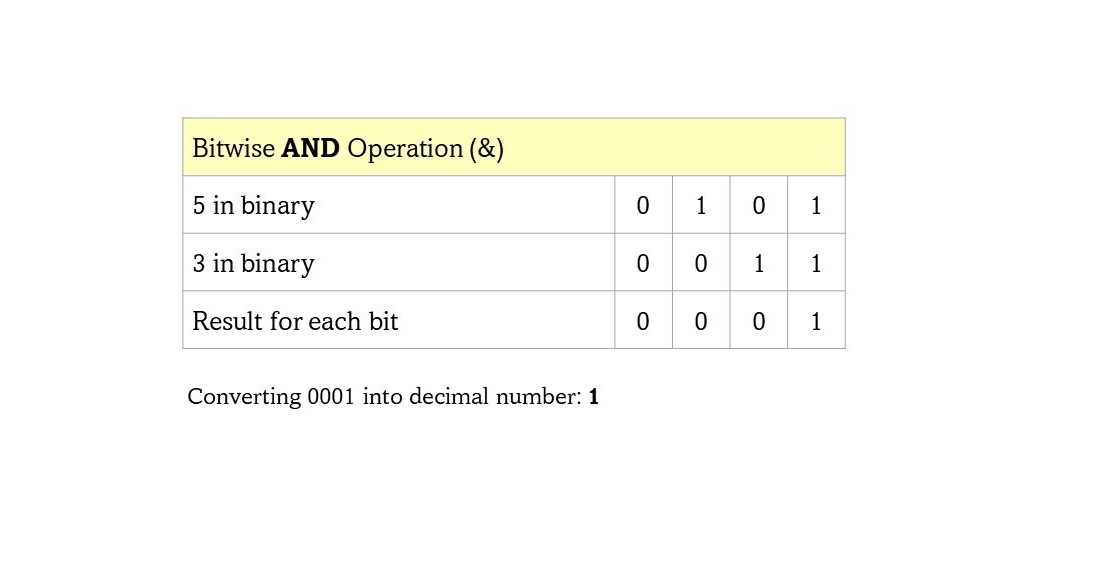
In this example, the bitwise AND of 5 and 3 produces 1. The binary representations of 5 and 3 are 0101 and 0011, respectively. Performing a bitwise AND on these two numbers results in 0001, which is equivalent to the decimal value 1. For additional information on how it works, you may refer to the following diagram:
Bitwise OR (|):
The bitwise OR operator (|) performs a logical OR operation on the corresponding bits of two numbers. It returns a new number where each bit is set to 1 if at least one of the corresponding bits in the operands is 1. Otherwise, the bit is set to 0.
a = 5   # Binary: 0101
b = 3   # Binary: 0011
result = a | b
print(result)   # Output: 7 (Binary: 0111)
In this example, the bitwise OR of 5 and 3 produces 7. The binary representations of 5 and 3 are 0101 and 0011, respectively. Performing a bitwise OR on these two numbers results in 0111, which is equivalent to the decimal value 7. For additional information on how it works, you may refer to the following diagram:

Bitwise XOR (^):
The bitwise XOR operator (^) performs a logical XOR (exclusive OR) operation on the corresponding bits of two numbers. It returns a new number where each bit is set to 1 if only one of the corresponding bits in the operands is 1. Otherwise, the bit is set to 0.
a = 5   # Binary: 0101
b = 3   # Binary: 0011
result = a ^ b
print(result)   # Output: 6 (Binary: 0110)
In this example, the bitwise XOR of 5 and 3 produces 6. The binary representations of 5 and 3 are 0101 and 0011, respectively. Performing a bitwise XOR on these two numbers results in 0110, which is equivalent to the decimal value 6. For additional information on how it works, you may refer to the following diagram:

Bitwise NOT (~):
The bitwise NOT operator (~) performs a logical NOT operation on each bit of a number. It returns the complement of the number, where 0s become 1s and 1s become 0s. The result is dependent on the number of bits used to represent the number.
a = 5   # Binary: 0101
result = ~a
print(result)   # Output: -6 (Binary: 1010)
In this example, the bitwise NOT of 5 produces -6. The binary representation of 5 is 0101. Performing a bitwise NOT on this number results in 1010.
The Concept of Two's Complement
In this code snippet, we assign the value of 5 to the variable a. Then we perform the bitwise negation operation using the tilde (~) operator on a and store the result in the variable result. Finally, we print the value of result, which is -6.
The bitwise negation operation (~) flips each bit in the binary representation of the number. To understand how we get -6 as the result, we need to consider how numbers are represented in binary and the concept of two's complement.
In binary representation, positive integers are typically represented directly, while negative integers are represented using two's complement notation.
To calculate the two's complement representation of a negative number, we take the one's complement of the positive representation (invert all the bits) and then add 1 to the result.
Let's break down the steps for -6:
- The decimal number
5has the binary representation of00000000000000000000000000000101(32-bit). - To perform the bitwise negation, we invert each bit of
a:~abecomes11111111111111111111111111111010.
- Now, we interpret this binary representation using two's complement notation. In two's complement, the leftmost bit (the most significant bit) represents the sign of the number. If it is
0, the number is positive, and if it is1, the number is negative. In this case, the leftmost bit is1, indicating a negative number. To obtain the decimal value, we calculate the magnitude of the binary representation as follows:- Invert all the bits again (taking the one's complement):
00000000000000000000000000000101. - Add
1to the one's complement:00000000000000000000000000000110. - Convert the result into decimal numbers:
110 = 4 + 2 = 6
- Invert all the bits again (taking the one's complement):

Conclusion:
Bitwise operators in Python provide powerful tools for working with individual bits of numbers. Understanding these operators allows you to perform bitwise operations, manipulate binary representations, and optimize certain algorithms. By using the bitwise operators &, |, ^, and ~, you can explore a whole new level of control and manipulation of binary data in Python.
